Dashboard · for team members
DashboardCRM software for agencies TalkyTimes · Dream Singles (in development and active testing)
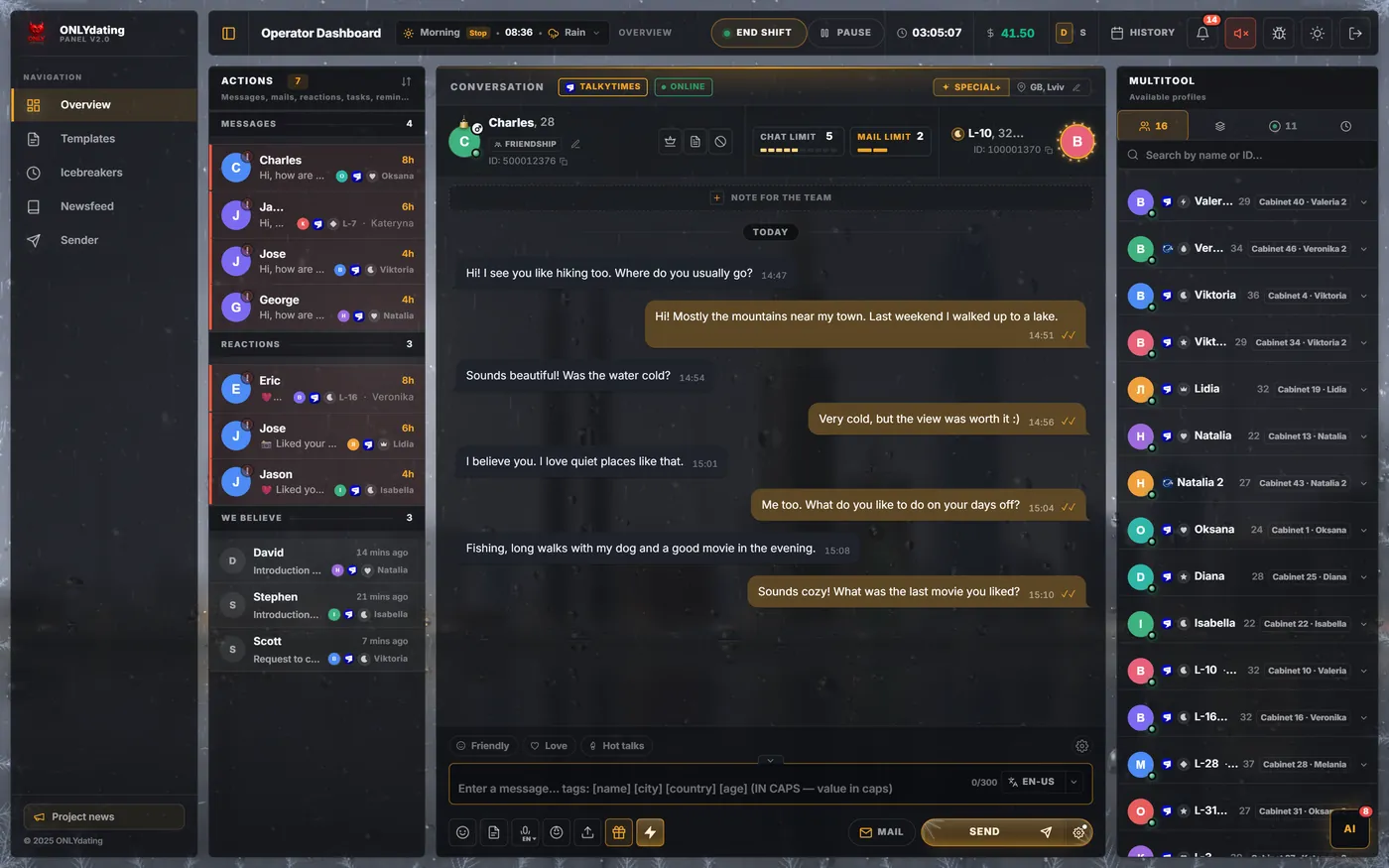
All your profiles — in one window
Behind the glass — your time 00:00:00
Dashboard · all profiles in one window
ONLYdating is software for agencies that work on dating sites. One service, two products, each connected separately: Dashboard, one workspace for all of an agency’s profiles, and CRM, the agency’s own site and team management.
- $0.25a day per profile
Dashboard - $0.25a day per user
CRM - 14days free
trial period - 50%bonus for an invited agency
referral program
01 Who we are
We make the software. The agency does the work on the platform
not us
- The dating site, its profiles and its users
- Hiring the team and running the profiles
- Communicating with platform users
- Platform users’ payments — they don’t go through us
us
- Dashboard — a workspace for the agency’s team
- CRM — the agency’s site and team management
- Payment for access to the software: $0.25 per day per profile or user
The software is made for working in line with platform rules.
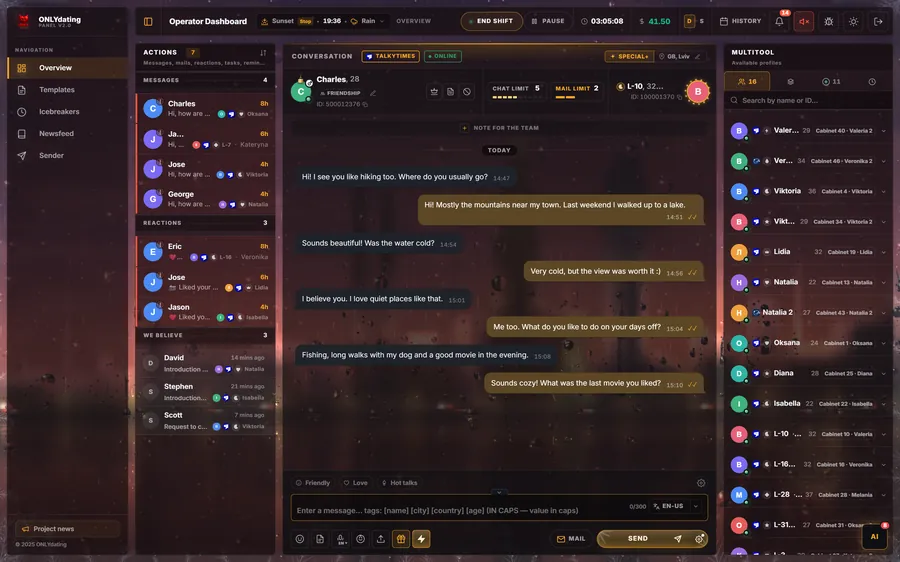
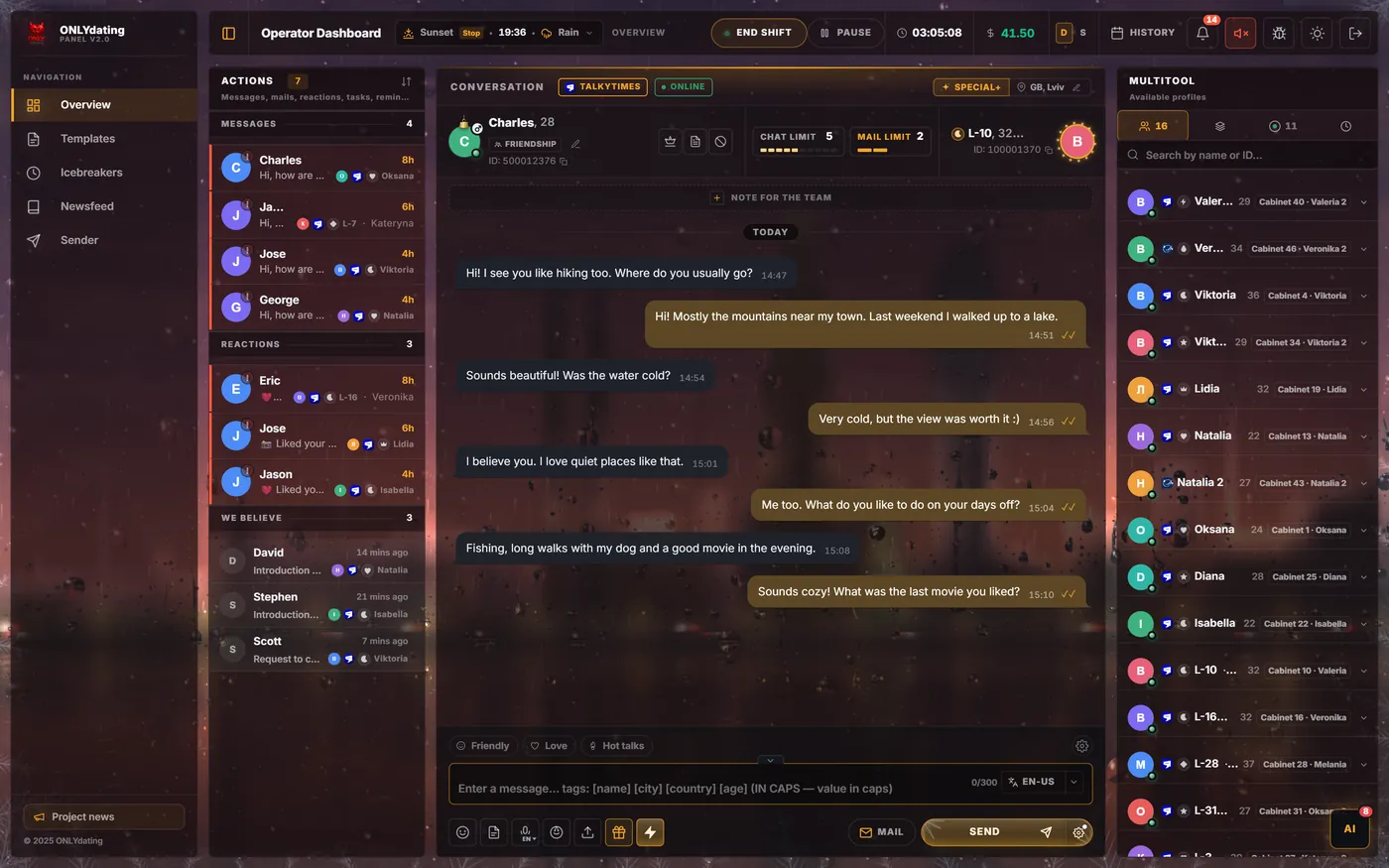
Click a dot in the frame or an item in the list to see which agency task that part of the software handles.
 Premium — at the top of the column Platform request answered — the card has left the column
-
The shift balance, with a row for every credit: what for, which profile, how much.
More -
Everything that needs attention: manager tasks, letters, messages, reactions, auto-replies, reminders and chat requests from the platform (TalkyTimes). Premium and VIP+ conversations sit higher.
More -
Platform limits are shown above the conversation. Response time counts from the moment a reply became possible.
More -
During a pause, profiles pass to a stand-in. The shift closes on its own at the end of the group’s working hours.
More -
Before sending, each message is checked for links, contacts and the group’s stop words. The translator sits right in the input field.
More -
A profile list with filters and search: who’s online, where a reply is due. Any profile is one click away.
More
-
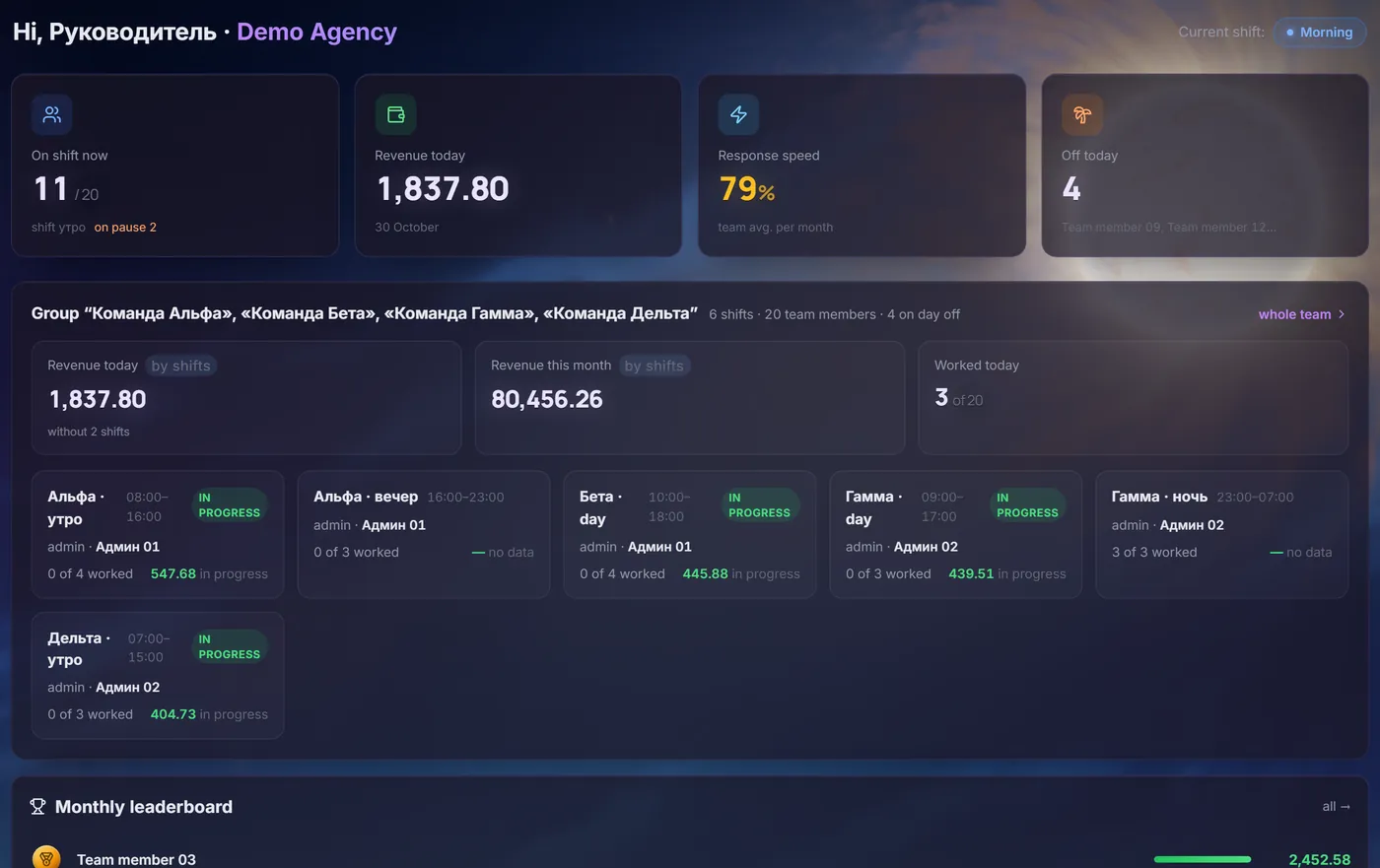
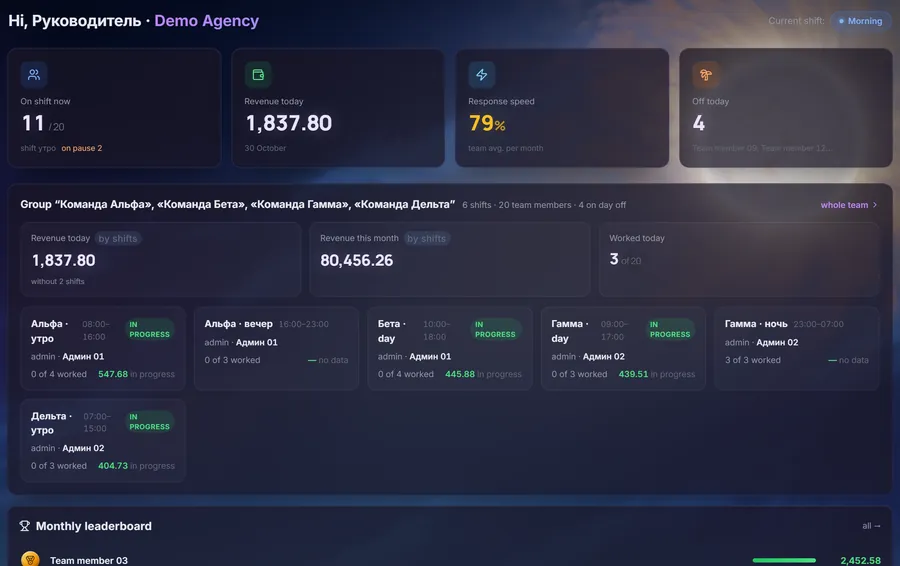
How many team members are working this minute and which shift is on — without calling around the team leads.
More -
The agency’s revenue for today, on the first page. Details are in Balances and metrics.
More -
The team’s average response speed for the month.
More -
Who has the day off today is visible on the first page, with no need to ask the team lead.
More -
What each shift has made today, from Dashboard every half hour.
More -
A monthly team member ranking. Details on each person are in team member metrics.
More
Every task in detail, with screenshots and demos
CRM · for managers
Six tasks of a manager
- 01Agency site
- 02Team and access
- 03Team member metrics
- 04Profiles and platforms
- 05Balances and earnings
- 06Integrations
You can’t see them when they happen: a message that breaks the rules, a missed dialog or a calculation error only comes to light later. Below is how each one looks day to day and what Dashboard and CRM do about it.
# Where it’s lost What it looks like With the software
01
A message that breaks the rules
lossA team member sent a link or someone else’s contact. To the platform that is a violation, and the whole agency answers for it.
DashboardThe text is checked before sending: a message with a detected link or contact isn’t sent, and the manager sees in the log who wrote it. How the check works
02
A forgotten conversation
lossThe chat partner already talked about this — two years ago, somewhere in the letters. There’s no time to search, so the team member asks again.
DashboardOn request, the AI assistant goes through the whole chat and letter history and shows exactly where it was said. A person decides and writes. How it searches
03
A dispute over numbers
lossFor forty minutes the platform didn’t allow a reply, yet the slow reply was counted against the team member. They argue; you don’t trust the metric.
Dashboard · CRMResponse time counts from the moment a reply became possible. From the same data, CRM builds a Score from 0 to 100 — by the same rules for everyone. Team member metrics
04
A dialog nobody noticed
lossNotifications are scattered across tabs. An important message sinks in the stream and gets noticed after the chat partner has gone offline.
DashboardEverything waiting for a reply is gathered in one Actions column. Manager tasks and Premium and VIP+ dialogs sit above the rest. The Actions column
05
Money in spreadsheets
lossBalances are reconciled by hand, and earnings are tallied in a shared spreadsheet. At month’s end not everything adds up — and nobody remembers why.
CRMCRM itself captures profile balances at shift boundaries and calculates earnings by the agency’s rules, down to the “Payout” amount. CRM calculates; the agency pays. Balances and earnings
The city behind the glass and the rain on this site are Dashboard’s Obsidian design. There are two more: Cosmic, with a live sky, and Messenger. Switch the time of day in the demo below, and the city behind this site’s glass switches with it.
CRM pulls data from the platform’s admin panels and analytics on its own, and exchanges team members, shifts, shift results and earnings with Dashboard automatically, within a minute to half an hour. The Dashboard exchange works when the agency has connected both products.
Adding team members and shifts in two places
Your team structure is always in view: a team member from Dashboard appears in CRM right away, groups and shifts after every change
right awaySitting in on admins’ calls to see how they run them
Call QA: a rating of how the admin runs the call, plus a short digest: summary, strengths, gaps
after the callGuessing where and who is lagging behind: there was no detailed rating of each shift
Shift data arrives from Dashboard every 15 minutes, and Score against your targets shows where and who is lagging behind
15 minKeeping earnings in shared spreadsheets nobody could read without explanations
Earnings are calculated in CRM by the agency’s rules, in one clear table; a manual fix for a day goes to Dashboard and replaces the calculation
5 minPulling profile balances and metrics from different places into a spreadsheet
Profile balances and metrics in one place: quick analysis without wasting time. Balances are taken at shift boundaries, and the previous day is checked overnight
shiftLogging into a dozen admin panels to check and edit profiles
All profiles in one window: a clear view, plus managing and editing them without logging into a dozen admin panels. Metrics and photo CTR update every morning
mornings
The agency site, team, metrics, profiles, balances and integrations are on the CRM page
CRM in detailYou can buy software and be left alone with it. We do it differently: every agency has its own working chat with our team, and improvements come from your own requests. Response times and requests are counted from these chats, 2 June to 10 November 2026; the number of people is our estimate.
7 min
Half of new requests got a first reply within 7 minutes.
9 min
At night, 22:00 to 08:00, a little longer: half of requests got a reply within 9 minutes.
160+
agency requests have been marked “Done” in our tracker since July: from fixes to new features.
≈ 900
people, by our estimate, work in Dashboard and CRM: agency team members and managers. November 2026.
- emergencyUrgent
The agency’s working chat has a /sos command: a bot calls the people on duty until someone answers. One such call was picked up in 18 seconds.
- in the appBug report
Sent straight from Dashboard and CRM. Each report has a status, and the conversation with support about it lives in the “My requests” section.
- on requestImprovements
Something missing for the way you work? Tell us. One agency asked to add team members to a shift with a button instead of drag and drop: it’s easier on a tablet. A week later the button was there.
- in the openOutages
We post updates and outages in our channel. When the hosting let us down in September, every agency got a promo code for a free week.
Dashboard checks outgoing messages before they’re sent, and managers see which team member sent what. That makes it easier for an agency to follow platform rules and see who breaks them.
Pre-send checkdemo
Checking…Send
Manager log · demo
My site: example.com
How was your day?
Message me: t.me/example
Find me: 𝚎𝚡𝚊𝚖𝚙𝚕𝚎.𝚌𝚘𝚖
My number is +1 555 010 0199
- 01
Links and contacts
Links, domains, email addresses, @handles, t.me and phone numbers — including disguised ones. A message like that isn’t sent.
- 02
Group stop words and repeats
The manager sets the group’s list of banned words. Dashboard warns about sending the same text to the same chat partner again.
- 03
Meeting and travel promises
Dashboard looks for promises of a meeting or a trip that could mislead: it doesn’t send a message like that, or it warns the team member and explains why.
- 04
The log and who sent it
Whatever the check stopped goes to the log. The manager sees which team member wrote it and can review the case.
Checks help spot a possible violation before sending, but they’re no guarantee: they don’t catch everything and are sometimes unavailable. The agency is responsible for following platform rules.
Each agency’s data is kept apart from other agencies, and inside, access is split by roles the manager sets. Here is how we look after it, in short.
1 : 1
One agency, its own data: other agencies can’t see it, and inside, access is split by role.
EU
Dashboard and CRM servers are in the EU. Some data is stored and processed by outside providers, including outside the EU.
0
automatic screenshots or keystroke logs. We note when a person is active, work events and sign-ins.
- workingEncryption
Everything between you and the software is encrypted. Passwords for platform panels and profiles, and access keys, are stored encrypted.
- workingRoles
Everyone has their own scope, and in CRM the manager decides which sections are open to whom.
- workingSign-ins
In Dashboard, sign-ins and actions go to a log; in CRM, any active session can be ended.
08 Pricing · calculator
Two products. Pay only for the one you need
Dashboard and CRM are independent products. Connect one, the other or both: CRM is not required for Dashboard, and Dashboard is not required for CRM.
Discuss the estimate on Telegram
Opens @onlydating2 in Telegram with your estimate — you press send
- 01
Message us on Telegram
@onlydating2: tell us how many profiles you have and which products you need — Dashboard, CRM or both.
- 02
We set up your agency
We’ll open access, move your profiles over from your list and show the team how everything works. A new agency gets 14 days free.
- 03
Continue at the standard rate
After the trial: $0.25 per day per profile or user.
FAQ
Are you a dating site or an agency?
Neither. ONLYdating is a software vendor. We are not a platform or an agency, we don’t correspond with platform users, and their payments don’t go through us.
Do I need CRM to use Dashboard?
No. They’re independent products: CRM is not required for Dashboard, and Dashboard is not required for CRM. You can connect one or both.
Which platforms does the software work with?
TalkyTimes. Dream Singles is in development and active testing. ONLYdating is not affiliated with TalkyTimes, Dream Singles, Tableau or the companies that own or operate these platforms and services; names are trademarks of their respective owners.
Who is responsible for following platform rules?
The agency. The software helps: it checks messages before they’re sent and shows managers who sent what. But the checks don’t catch every violation. Violating platform rules or the law is grounds for terminating access.
Where is the data stored?
Dashboard and CRM servers are in the EU. Some data is stored and processed by outside providers, including outside the EU.
How much does it cost?
$0.25 per day per profile in Dashboard and $0.25 per day per user in CRM. The first 14 days are $0. You can work out the total for your agency in the calculator.
Is there a referral program?
Yes. Every agency has its own code in Billing. A new agency enters it within 30 days of signing up. The inviting agency gets 50% of what the invited agency pays for each profile first connected to Dashboard, during that profile’s first 30 days, credited to its balance. Only real payments count, not promo codes or bonuses, and the bonus comes once per profile. Inviting yourself is not allowed.
Want to discuss individual referral terms? Message us on Telegram: @onlydating2.
How do I try it?
Message @onlydating2 on Telegram, and we’ll open 14 days free.